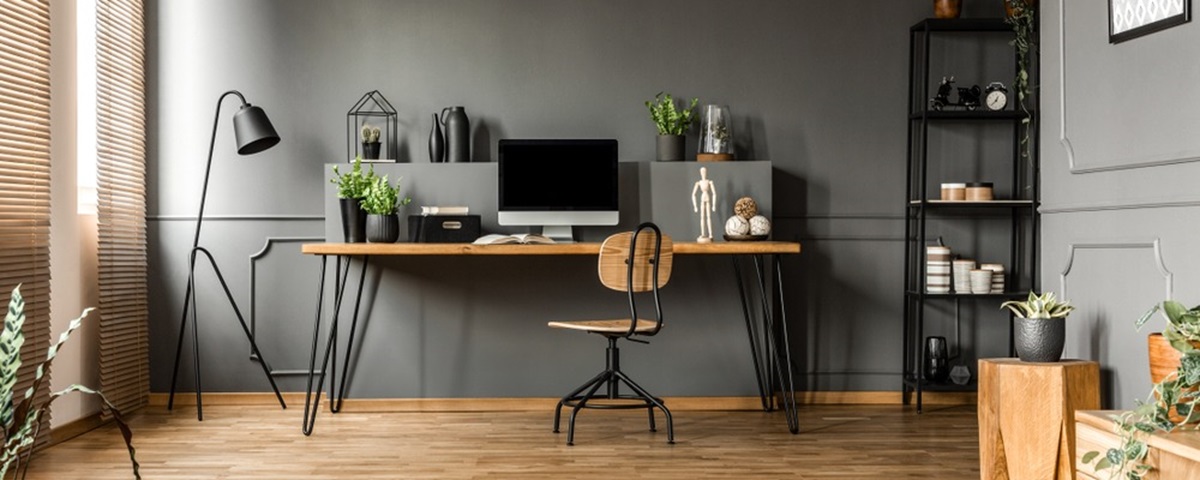
Choosing the right space for your home office may help support work-life balance. Your office layout, furniture and lighting can also influence focus and productivity throughout the day.
Our guide offers some tips for designing an office in your older property or new-build home.
Why a well‑designed home office matters
A well‑designed home office can offer a dedicated area for focused work and help create clearer boundaries between your work and personal life.
A suitable workspace setup can also influence posture, including helping to reduce back or neck discomfort that some remote workers experience. 1
When designing a home office, it might be worth thinking about how your environment can affect concentration. A cluttered, poorly lit space could feel draining, whilst a thoughtfully arranged workspace may enhance focus and motivation.
Choosing the right space for your home office
Selecting a quiet area with fewer potential distractions, such as minimal foot traffic or noise, can support concentration.
An unused room may offer more privacy and separation from daily activities, while small corners or hallway landings may also work if they can comfortably accommodate a desk and chair. It might also be worth checking that power outlets are within reach.
Tips to improve your home office environment
Choosing the right space for your home office is not only about the desk location. The wider environment can also influence how comfortable and productive you feel. For example:
-
Opening windows regularly may help boost energy and focus
-
Maintaining appropriate lighting throughout the day could help reduce eye strain
-
Keeping water at your desk can help remind you to drink water and stay hydrated
-
Taking scheduled breaks may support productivity
Furniture for a comfortable workspace
Home offices usually include a desk and chair. While individual needs vary, choosing suitable furniture can help support your posture. Certain factors like working with display screen equipment (DSE) can affect your posture over time. An ergonomic chair and suitable desk setup may help support your posture. Ergonomic furniture is designed to support natural posture reduce strain and increase comfort.
Ergonomic chairs
If you spend much of the day seated, you may find ergonomic chairs with lumbar support more comfortable, as they can help maintain the spine’s natural curve. Armrests that allow your shoulders to relax may also support your forearms at desk height. The position of your legs may also impact comfort and the Health and Safety Executive (HSE) suggests aiming for a small gap of around 2–3 cm between the seat edge and the back of your knees. Adjustable seats may also offer flexibility, helping your feet rest flat on the floor or on a footrest.
Desks
According to the HSE, the ideal desk height will often allow the top of your screen to sit level with your eyes, and your keyboard to be positioned just below elbow height.
Types of desks you may come across include:
-
Standard desks, which often measure around 120cm wide and 60cm deep
-
Standing desks, which may help you alternate between sitting and standing
-
Desks with built‑in cable management to keep wires organised
-
Adjustable‑height desks that may suit different tasks
-
Fold‑down desks that offer functionality without taking up permanent floor space
Home office aesthetics
In addition to supporting your posture, a chair and desk can also contribute to the look of your home. If your home’s aesthetics are important to you, it might be worth considering how your furniture complement’s your overall style and design.
How to support your posture when using DSE
Keeping ergonomics in mind when creating your home office may help protect you from strain or injury when using DSE.
The HSE’s guidance on good posture when using DSE suggests the following:
-
Keep the top of your screen level with your eyes, and about an arm's length away
-
Relax your shoulders, aiming to position yourself high enough so you don't need to shrug your shoulders
-
Keep the keyboard just below elbow height
-
Ensure your seat height equally supports the front and back of your thighs (you could use a cushion to raise the seated position)
-
The back of your seat should provide good lower back support (or you could use a cushion to provide additional support)
-
There should be a gap of 2–3 cm between the front of the seat and the back of your knee
-
The computer and screen should be directly in front of you
-
Your screen and keyboard should be central, so you don't twist your back
-
Keep your mouse in line with your elbow
Lighting
Aside from furniture, lighting can also be an important element in your home office. Good lighting may help reduce eye strain, which can be particularly relevant for DSE users who use screens and may be susceptible to glare.
Here are some steps that could help improve your lighting setup:
-
Positioning your desk by a window for optimal lighting. Natural light may help reduce eye strain, headaches and fatigue
-
Choosing bulbs with an appropriate colour temperature. If your home office lacks windows, bulbs that can mimic natural light may offer a similar effect
-
Layering your lighting. Overhead fixtures may work well for general illumination, with task lighting over your workspace
-
Using adjustable desk lamps. These may help you direct light where it’s needed without creating screen glare
Can working with DSE cause eye damage?
According to the HSE, working with DSE does not cause permanent eye damage, but long spells may lead to tired eyes, discomfort, temporary short‑sightedness or headaches.2 Making reasonable adjustments, such as improving lighting conditions, may help to reduce eye strain.
Boosting productivity through design
The overall design of your home office, including layout, colour and décor, may shape how it feels to work in it.
Colour
Colour psychology may play a role when designing a home office. Different colours are often associated with different moods:
-
Blue tones are associated with creating a calming environment
-
Yellow may brighten your surroundings
-
Red may be best used sparingly, or as small accents around your home office
Some people prefer colours that match the rest of the home, while others opt for a palette that’s specifically for their home office.
Layout
Your office’s layout can also be important. You might choose to create distinct zones for different activities, such as a computer station for focused work and a separate area for reading or phone calls. Regular desk decluttering may help support focus and clarity. You can find more practical tips in our guide to decluttering your home.
Plants and décor
Décor can work well to make your space feel like your own. Some individuals may include personal touches like family photos or artwork. You may even want to use a notice board or calendar to help with time management.
Houseplants can brighten up your workspace and bring the outdoors in. Some plants, such as snake plants, pothos and spider plants, may require minimal maintenance, which could suit busier working days.
Setting boundaries for work-life balance
Whether you work fully remotely or use your home office only occasionally, setting boundaries may support a healthier work-life balance. These can include:
-
Setting clear working hours to help maintain structure. Physical separation between work and home life may support mental wellbeing
-
Packing away work equipment at the end of the day or closing your office door. This can help signal the transition from work time to personal time
-
Using a separate work phone or computer, which can make it easier to disconnect outside working hours
-
Taking scheduled breaks, whether it’s a short walk or making a cup of tea, to help you feel more refreshed
Storage and organisation
Effective home office storage may help prevent clutter from building up. If you feel your home office would benefit from more organisation, it might be worth exploring options such as:
-
Wall‑mounted shelving to maximise space without taking up floor area
-
Floating shelves to keep frequently used items within reach
-
Cable organisation to help reduce wire tangles and create neat systems
-
Drawer dividers to help separate stationery, documents and supplies
-
Filing systems to organise important documents
-
Labelled storage boxes and folders to make items easier to locate
-
Closed storage options like cabinets for items you don't need daily, which may help reduce visual clutter
Smart home tech
Technology may help make your workday feel more streamlined. Some equipment that could potentially support your home office space include:
-
Dual or triple monitor setups
-
Wireless chargers to reduce clutter
-
Noise-cancelling headphones
-
Smart lighting systems to adjust colour temperature throughout the day
-
Productivity apps like time trackers, project management tools and website blockers help maintain focus during working hours
-
Smart plugs so you can schedule equipment to power down at the end of the day
FAQs about designing a home office
-
Equipment for an ergonomic home office may include an adjustable chair with lumbar support, a desk at a suitable height, a monitor at eye level and a keyboard just below elbow height, with a mouse in line with your elbow.
-
Although this varies, small spaces can still work well as home offices. You may need to make certain adjustments, such as choosing compact, wall‑mounted fold‑down desks that don't take up permanent floor space, or corner desks to maximise more awkward areas. Vertical storage, such as floating shelves, may also keep essentials within reach without cluttering surfaces.
-
The ideal desk height typically allows the top of your screen to align with your eyes and your keyboard to sit just below elbow height. For more information, see the HSE’s guidance on good posture.
-
Lighting may be improved by positioning your desk near windows to maximise natural light, ideally at a perpendicular angle to reduce glare. Adjustable desk lamps can support task lighting, and daylight bulbs may help provide a natural effect.
Ready to buy a brand-new home? Explore our unique homebuying offers and start your homeownership journey with David Wilson Homes today. Terms and conditions apply.
Related Articles
-

Moving from renter to homeowner
Jul 06, 2026 -

How to buy a home for the second time
May 07, 2026


